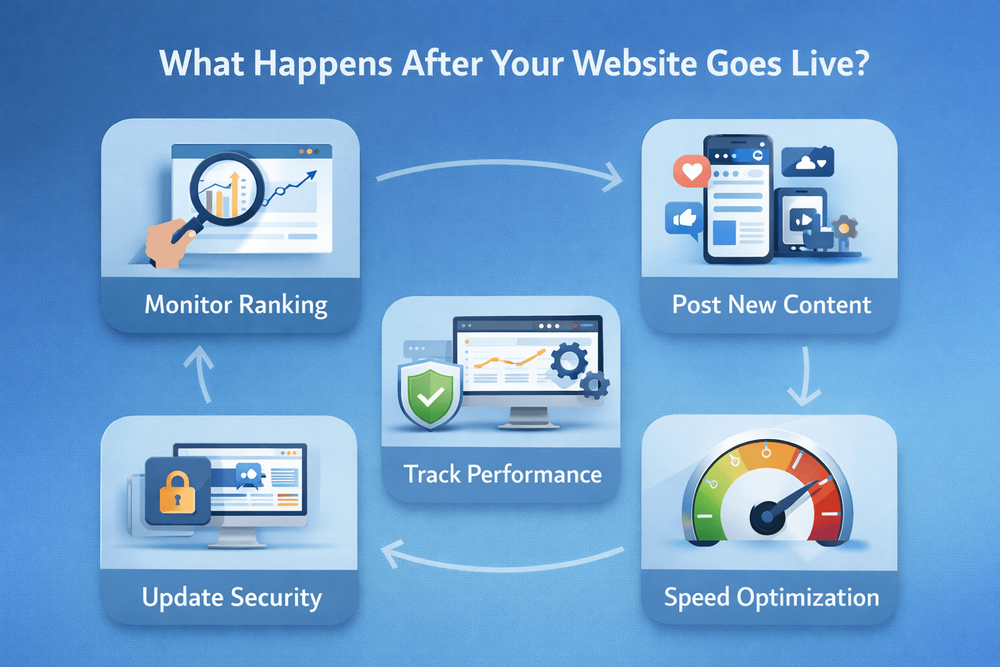
What Happens After Your Website Goes Live?
Your website is live. But launch day isn't the finish line. Here's what actually needs doing after your site goes live - and what you can safely ignore.
Quick answer
Your website is live - now what? The first few weeks after launch are when you need to pay the most attention. Test everything yourself: fill in your contact form and check the message arrives, click every link, open the...
Key takeaways
- Your website is live - now what?
- Content that goes stale
- Keeping your site secure and up to date
- Checking whether your site is actually working
Your website is live - now what?
The first few weeks after launch are when you need to pay the most attention. Test everything yourself: fill in your contact form and check the message arrives, click every link, open the site on different devices, and ask a friend to try finding your phone number without any guidance.
It's also worth checking that Google can actually find your site. Search for your business name and see what comes up. If your new site isn't appearing yet, give it a couple of weeks - but if it's still invisible after a month, something may need fixing. We covered how Google finds and ranks small business websites in our post on whether small businesses actually need SEO.
These early checks aren't glamorous, but they catch problems while they're easy to fix. A broken contact form on launch day is a two-minute fix. A broken contact form that's been silently losing enquiries for three months is a much bigger problem.
Content that goes stale
We've reviewed sites where the footer still listed a phone number the business hadn't used in two years. Another had a "Meet the Team" section featuring three people who'd left the company. These aren't huge problems in isolation, but they add up - and they tell visitors that nobody's minding the shop.
One thing that catches businesses out is seasonal content. A promotion that ran over Christmas, still on the homepage in March. A "Now hiring" banner for a position that was filled months ago. These small oversights don't just look sloppy - they can actively confuse visitors or set wrong expectations.
Set a reminder to review your website every two or three months. Check that your services, contact details, opening hours, and team information are all current. It doesn't take long, and it prevents the slow drift from "up to date" to "clearly neglected" that happens when nobody's looking.
Keeping your site secure and up to date
Every website runs on software, and software needs updating. What this looks like depends on how your site was built. A WordPress site might need regular updates to plugins, themes, and the core software itself - skip these for too long and you risk security vulnerabilities or things simply breaking. A custom-built site on a modern framework typically needs far less hands-on maintenance, but it's not zero.
Backups are equally important. If something goes wrong - a bad update, a hack, or a hosting issue - a recent backup means you can restore your site quickly instead of rebuilding from scratch. Make sure someone is taking regular backups, whether that's you, your hosting provider, or your web partner.
SSL certificates - the padlock icon in your browser bar that shows a site is secure - also need to stay active. Most hosting providers handle renewal automatically these days, but it's worth checking. A site without SSL looks untrustworthy to visitors and gets penalised by Google.
Checking whether your site is actually working
The simplest check doesn't need any software. Ask yourself: when was the last time someone contacted you through your website? If you can't remember, your site might not be doing its job - or it might be doing its job badly. Before you look at analytics, start with that question. It tells you more than any dashboard.
We've lost count of how many clients have Google Analytics installed on their site but have never actually looked at it. The data is there - how many people visit, which pages they look at, how quickly they leave - but if nobody's reading it, it's just numbers collecting dust. Even a five-minute check once a month can reveal whether your site is earning its keep or just sitting there.
You don't need to become a data expert. Just look at a few basics: is traffic going up or down, which pages get the most visits, and are people actually getting in touch? If the traffic is there but the enquiries aren't, the problem is usually your site's content or structure - and our guide on how to tell if your website is costing you customers can help you figure out what's going wrong.
What you can do yourself and what needs help
One of the most common complaints we hear from business owners is that their previous web designer built the site and disappeared. No training on how to update content, no documentation, no way to make basic changes without paying for support. A good web partner should make sure you know how to update the things that change regularly - text, photos, opening hours - without needing to call someone every time.
There's a clear line between what a business owner should handle and what needs a professional. Updating your phone number, adding a new photo, or changing a service description - that's you. Performance issues, security vulnerabilities, structural changes, or anything that involves code - that's where a professional earns their fee. Knowing where that line is saves you time and prevents costly mistakes.
If your current site makes it difficult or impossible for you to update basic content yourself, that's a sign it may not have been built with your needs in mind. We've written about why this matters in our post on why we don't use templates - the right approach gives you control over the day-to-day while keeping the technical foundations solid.
Launch is the beginning, not the end
Your website is one of the most important tools your business has. But like any tool, it needs looking after. The good news is that most of the ongoing work is straightforward - a quarterly content review, keeping an eye on performance, and making sure the basics stay up to date.
The businesses that treat their website as a living part of the company - rather than a project that finished on launch day - are the ones that get the most out of it. A well-maintained site builds trust, supports your marketing, and keeps working for you around the clock.
If you're not sure whether your site is in good shape, or you want to know what needs attention, our weekend fixes guide is a good place to start with the quick wins.
Launched your site and not sure what comes next? We'll take a look and tell you what's working, what needs attention, and what you can leave alone.
Book a free consultationFAQ
What will you learn in "What Happens After Your Website Goes Live?"?
Your website is live - now what? The first few weeks after launch are when you need to pay the most attention. Test everything yourself: fill in your contact form and check the message arrives, click every link, open the...
Why is Your website is live - now what? important?
Because it directly affects trust, message clarity, and conversion before someone contacts you.
What is the best first step?
Apply one practical change this week, measure the result, and repeat with the next highest-impact improvement.

Categories: General