How to Choose the Right Images for Your Website (Without Using Stock Photos)
Stock photos are hurting your business more than you think. Here's how to use real images that build trust and show what you actually do.
Quick answer
Why stock photos are hurting your business We once reviewed a plasterer's website that had a stock photo of someone in a hard hat holding a paint roller as the homepage hero image.
Key takeaways
- Why stock photos are hurting your business
- What to photograph instead
- You don't need a professional camera
- How to use your photos on your website
Why stock photos are hurting your business
We once reviewed a plasterer's website that had a stock photo of someone in a hard hat holding a paint roller as the homepage hero image. The plasterer didn't wear a hard hat. He didn't use a paint roller. And the stock image was the same one we'd seen on at least two other trade websites that month. His real work was excellent - but you'd never know it from the site.
This is more common than you'd think. Stock photos might look professional at first glance, but they signal something to your visitors: this business didn't care enough to show their real work. And if a potential customer is choosing between two businesses - one showing glossy stock images and one showing real projects - the real one wins almost every time.
The problem gets worse when your competitor uses the same image. Free stock photo sites have a limited pool of popular images, and certain ones appear on thousands of websites. If your site looks the same as everyone else's, you're not building trust - you're blending in.
What to photograph instead
We had a client - a plasterer - who started taking before-and-after photos on his phone at the end of every job. Nothing fancy, just a quick shot of the room before and after. Within a few months he had a gallery of real work on his site, and he told us enquiries had picked up. People could see exactly what they'd be getting. That's worth more than any stock image.
One thing we always suggest to tradespeople and service businesses: show the work being done, not just the finished result. A photo of your hands fitting a pipe, laying plaster, or wiring a socket tells a visitor more about your skill than a polished portrait ever could. It's honest, it's specific to you, and nobody else has it.
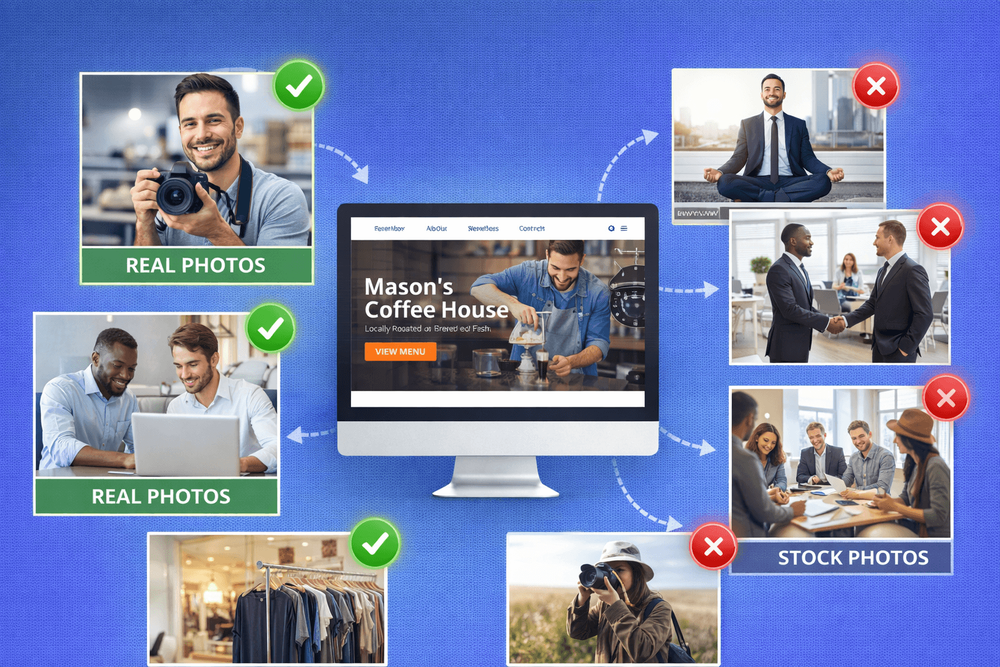
Here's what to aim for: photos of your finished work from different angles, before-and-after comparisons, your team on site or in action, your tools and workspace, and close-up details that show the quality of what you do. If you run a service business rather than a trade, think about photos of your workspace, your process, or you working with a client. The goal is to show what it's actually like to work with you.
You don't need a professional camera
A modern smartphone takes photos that are more than good enough for your website. You don't need to invest in expensive equipment or hire a photographer to start building a library of real images.
The single biggest upgrade most people can make to their phone photos is lighting. Step near a window or go outside. The difference between a photo taken under a fluorescent strip light and one taken in natural daylight is enormous - and it costs nothing. We always tell clients: if it looks yellow or dim on your screen, take it again closer to a window.
The other thing that makes a real difference: take far more photos than you think you need. For every job or project, take at least twenty shots from different angles and distances. You'll probably use two or three. But having options means you'll always find one that works - and you won't be stuck trying to make a single blurry photo look presentable.
A few more quick tips: wipe the camera lens before you shoot (it makes more difference than you'd expect), shoot in landscape orientation for website headers, and avoid using the zoom - move closer instead.
How to use your photos on your website
Once you've started building a collection of real photos, put them to work across your site - not just on a single gallery page.
Your homepage hero image should be your strongest photo - something that immediately shows what you do. Service pages should include photos relevant to that specific service. Your About page needs a real photo of you or your team, not a stock portrait. And if you've got before-and-after shots, consider organising them by project type so visitors can find work similar to what they need.
One thing people often forget: add alt text to every image. This is a short description of what the photo shows, and it helps Google understand your content. It also makes your site accessible to visitors using screen readers. Something like "kitchen replastering before and after in Leeds" is far more useful than "IMG_4523.jpg." We covered this in more detail in our post on whether small businesses actually need SEO.
Also, make sure your images aren't slowing your site down. Large photo files are one of the most common reasons websites load slowly. Resize your images before uploading - most website images don't need to be wider than 1600 pixels - and compress them using a free tool like TinyPNG. If your site is already slow, our weekend fixes guide covers how to check.
When stock photos are actually fine
Stock photos aren't always the wrong choice. For blog post headers on general topics, abstract background images, or illustrations of concepts that you can't easily photograph, they work perfectly well.
The rule of thumb is simple: if the image is supposed to represent your business, your work, or your team, use a real photo. If it's decorative or conceptual - like a header image for an article about website design - stock is fine, as long as it doesn't look like every other image on the internet.
If you do use stock, avoid anything with people in hard hats shaking hands in front of a whiteboard. Your visitors have seen it before. Instead, look for simpler, more natural images on sites like Unsplash or Pexels, and pick ones that feel authentic rather than staged.
Start building your image library today
You don't need to overhaul your website's images all at once. Start with your next job or project. Take twenty photos. Pick the best two or three and add them to your site. Do that consistently and within a few months you'll have a library of real work that no competitor can match.
Your website should look like your business - not like a stock photo catalogue. The businesses that show their real work, their real team, and their real results are the ones that build trust fastest. And trust is what turns a website visitor into a customer.
For more on making your website work harder for your business, take a look at our guide on website design for tradesmen or find out how to tell if your website is costing you customers.
Want honest feedback on how your website looks to potential customers? We'll review your site and tell you what's working and what's not.
Book a free consultationFAQ
What will you learn in "How to Choose the Right Images for Your Website (Without Using Stock Photos)"?
Why stock photos are hurting your business We once reviewed a plasterer's website that had a stock photo of someone in a hard hat holding a paint roller as the homepage hero image.
Why is Why stock photos are hurting your business important?
Because it directly affects trust, message clarity, and conversion before someone contacts you.
What is the best first step?
Apply one practical change this week, measure the result, and repeat with the next highest-impact improvement.

Categories: General