Website Design for Restaurants and Cafes: What Actually Gets You Bookings
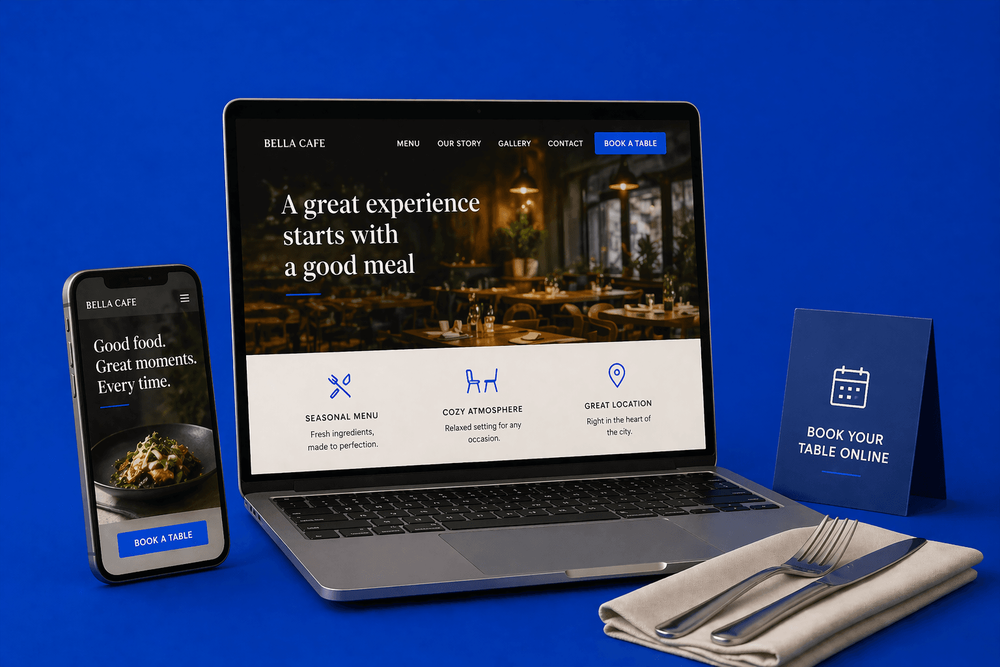
A restaurant website doesn't need to be fancy - it needs to show the menu, take bookings, and load fast on a phone. Here's what actually fills tables.
Quick answer
If you run a restaurant or café, you're probably not thinking much about your website. You've got service to run, staff to manage, suppliers to chase.
Key takeaways
- "We don't really need a website — we get customers through location and social media"
- First, a reframe — marketing is not an expense. The right marketing is an asset.
- And it does more than capture bookings — it builds an audience you own
If you run a restaurant or café, you're probably not thinking much about your website. You've got service to run, staff to manage, suppliers to chase. Location brought you the first customers. Word of mouth brings the regulars. Social media covers the rest. The website is the thing you set up years ago and haven't touched since.
Here's why it matters more than you think — and what it actually needs to do.
"We don't really need a website — we get customers through location and social media"
This is the single most common thing we hear from restaurant and café owners. And it's half right. Location, word of mouth, and social media do drive customers. But they drive different customers than a website does — and missing that distinction is costing you real revenue.
First, a reframe — marketing is not an expense. The right marketing is an asset.
This is where most restaurateurs go wrong before they've even looked at their website. They put "marketing" in the same mental bucket as rent, stock, or energy bills — money that goes out and has to be spent again next month. That's true for some marketing. A Facebook ad campaign, an Instagram boost, a flyer drop — you pay, it runs, you stop paying, it stops working. That's an expense.
A well-built website is the opposite. Think about your kitchen. A pizza oven costs a few thousand pounds. You pay for it once, and it earns its keep every service, for years. Nobody calls that an expense — they call it equipment. A proper website is the same category of spend. You pay to build it once, and it brings you customers every time someone searches your area, every Friday night somebody's deciding where to eat. The cost is fixed. The return keeps coming. That's what makes it an asset and not an expense — and it's why the restaurateurs who figure out the difference stop burning money on ads that stop working the second they stop paying.
A café owner came to us last year genuinely skeptical that a website would do anything her social media wasn't already doing. Great food, steady regulars, a decent Instagram following — the business was ticking along. She'd been pouring money into boosted posts for three years and couldn't tell us whether any of them had brought her a customer. We rebuilt her site with a proper booking button, a real menu page, and an email capture for her seasonal offers. Eight months in, roughly 40% of her bookings came through the site, her email list had 800 people on it, and she'd stopped boosting posts entirely. She told us it was the first marketing spend she'd ever made that actually compounded.
And it does more than capture bookings — it builds an audience you own
A website is the one place you can actually build a customer base you keep. Someone books online — you have their email. Someone signs up for a newsletter offering 10% off their first visit — you have their email. Someone asks about a private event — you've got their contact details. That's a list of people who've already chosen you once, which you can nurture over time. Send them an email when you launch a new seasonal menu. A reminder the week of their anniversary. A "we're back open after the refurb" note.
Social media can't do that. Your followers aren't yours — they belong to the platform. If the algorithm changes or your account gets suspended, that audience is gone. Your email list of past customers is yours forever, and it brings people back through the door again and again at effectively zero cost. One customer who visits once is a transaction. One customer you can reach again is the start of a relationship that compounds.
Second — social media is brilliant at some things and terrible at others
Whether your channel of choice is Instagram, Facebook, TikTok, WhatsApp groups, or something else — social media is great for showing off your food, building a loyal following, and reminding regulars you exist. But here's what social media can't do:
- Convert people who are deciding right now. When someone searches "Italian restaurants near me" on a Friday at 7pm, they're not scrolling TikTok — they're on Google. Roughly half of all restaurant website traffic comes directly from Google search. If your site doesn't rank or doesn't load cleanly, they pick somewhere else.
- Show up-to-date information to people who don't follow you. A Facebook post about your opening hours helps the people who already follow your page. It does nothing for the thousands of people in your city who've never heard of you and are searching tonight.
- Get found by people searching your city. Social posts with menu photos aren't indexable by Google. People searching "vegan options in Reading" or "brunch in Clifton" won't find you unless the words are on your website.
- Take bookings and orders while you're busy. The phone rings at 8pm on a Saturday. Nobody picks up — you're plating. That booking is gone. A website with a booking button takes the reservation whether you're busy or not.
The goal isn't to replace your regulars, your location, or the social community you've built. It's to capture the people making the decision right now — and that decision is overwhelmingly happening on Google, on a phone, in the ten minutes before someone walks out the door to find dinner.
What your customers are doing before they book
Around 77% of diners check a restaurant's website before visiting. Roughly 70% of bookings are now digital. Close to half of all restaurant website traffic comes directly from Google. What they're actually looking for is narrow: the menu, the location, opening hours, and how to book. That's it. If your site makes any of those four things hard, you're losing covers.
The non-negotiables
1. The menu — visible, up to date, not a PDF
When we open a restaurant website for the first time, we don't look at the homepage — we look at the menu. On mobile. If it's a PDF, we know most of the story already. If it loads instantly as a proper page, with prices and ideally photos of a couple of dishes, the site is probably doing at least half its job. The menu is the single thing most of your visitors came to see. Everything else on your website is scaffolding around that one page.
A client came to us convinced his website was fine and the real problem was SEO. We opened his site on a phone. Tap on "Menu." A 12MB PDF started downloading. It opened sideways. The prices had an old format from two menu updates ago. Nobody was reading that menu — they were closing the tab and going to the restaurant down the road whose menu showed up instantly as a proper web page. We rebuilt his menu as a single HTML page with photos of his three best dishes. Bookings went up 30% in the first two months. The "SEO problem" was that nobody could read his menu.
PDFs are slow, don't work well on mobile, and Google can't read them for local SEO. Put your menu on a page, in text, with photos of the key dishes. Update it when the menu changes — a stale menu is actively misleading.
2. Booking and ordering buttons that actually work on mobile
This is two separate things that get confused: booking (for sit-down tables) and ordering (for takeaway or delivery). Both face the same problem — friction kills conversion — but they need different tools.
For bookings: use a proper booking system. ResDiary, OpenTable, Tock, and SevenRooms are the common ones in the UK; simpler widgets exist for smaller venues. What you don't want is a "please email reservations@..." link in the footer. That's a booking system for 2008.
The booking button must:
- Be visible on every page, not buried in a menu
- Work in one tap on mobile
- Not open pop-ups or require account creation
- Give an instant confirmation
For ordering: decide whether you take direct orders or rely on aggregators. The choice matters financially:
- Direct ordering (via something like Flipdish, Toast, or Slerp) keeps the full margin — you're not paying Deliveroo or Just Eat 20–30% commission on every order
- Aggregator apps (Deliveroo, Just Eat, Uber Eats) reach more customers but take a significant cut
Many restaurants run both. Whichever you choose, the order button needs to be as prominent as the booking button on your site, and work just as cleanly on mobile.
3. Real photos of real food and the real space
A recent client was adamant she couldn't use her own phone photos of her food because they "weren't professional." We asked to see them. They were great — good light, decent angle, actual food from her actual kitchen. We put three of them on her homepage instead of the stock images that had been there. The site felt immediately more like the restaurant it was describing. A phone photo of the real thing beats a studio shot of someone else's food every single time. Your customers aren't judging the photography — they're judging whether they can trust the restaurant.
The stock photo problem is the one that makes us wince the most. We see sites all the time where the homepage has a beautiful, professionally-lit shot of a steak that clearly didn't come from that restaurant — it came from Shutterstock. Then the customer walks in and what arrives at the table doesn't look anything like what the website promised. That's worse than no photos at all. It's a broken promise on the first impression. Customers feel it, even if they can't name it. If you can't show your own food, don't show any.
Our guide on how to choose the right images for your website goes deeper on this.
4. Address, hours, and phone — on every page, not just Contact
People leave a restaurant website the moment they can't find the address. Put it in the footer on every page. Make the phone number clickable on mobile (tapping it should call, not copy-paste). Make the address clickable too (tapping it should open the user's default maps app with directions ready).
Opening hours must be visible and accurate. "Open until late" means nothing. Write the actual hours and update them the second they change — especially for holidays, refurbishments, or days off. A customer who turns up to a closed restaurant because your website said you were open is a customer you've lost twice.
5. Google Maps and Google Business Profile
Half your visibility for "restaurants near me" is your Google Business Profile, not your website. Photos, hours, menu link, recent reviews — keep it alive. Embed a map on your Contact page. These two together are worth more than most SEO campaigns. If you're not already collecting Google reviews actively, our post on that is probably the next thing to read.
Mobile isn't just where bookings happen — it's where orders happen
More than 70% of restaurant website traffic is mobile, and for casual dining, cafés, and takeaways that number is higher. People aren't just checking your menu on mobile — they're ordering food, booking tables, and deciding whether to visit right now, often while they're walking past or sitting in another venue.
What that means in practice:
- One-tap ordering. If you take direct takeaway or delivery orders, the order button has to be as prominent as the booking button. Both need to work in one tap.
- Mobile-friendly menus. PDFs are catastrophic on mobile — they pinch-to-zoom, download unnecessarily, and look broken. Menus must be HTML pages, readable without zooming.
- Clickable phone number. On mobile, tapping the phone number should call it. Not copy-paste it. Not open an email draft. Call it.
- Clickable address. Tapping the address should open the user's default maps app with directions ready to go.
- Load speed. Diners deciding where to eat make fast decisions. A site that takes 5 seconds to load on 4G has already lost the booking before it appeared on screen.
The website that works on mobile isn't a nice-to-have for restaurants. It's where most of the work of winning a customer actually happens.
What "gets you bookings" actually means
The decision chain a diner goes through is short:
- They search — "Italian near me", "restaurants in Brighton", a friend's recommendation
- They land on your site, from Google or a listing
- They look at the menu to decide if they want to eat here
- They look at photos to decide if the vibe is right
- They check location and hours
- They book — or they close the tab and move on
Every page and every button is about moving them down that chain. Nothing else on your website matters as much as the friction between steps. Clever design, nice animations, a homepage video of someone drizzling olive oil — none of it helps if the booking button isn't obvious on mobile.
What you don't need
- A homepage hero video of someone slow-motion pouring olive oil
- A loading animation
- An "Our Story" page that's 600 words long (nobody reads this)
- A blog — unless you genuinely have something to say
- Parallax scrolling, animated cursors, or any trend that prioritises looking interesting over being useful
The restaurant website in five pages
For most independent restaurants and cafés, this is all you need:
- Home — menu teaser, book and order buttons, photos, address, hours
- Menu — full menu, in text, with prices and key dish photos
- Book a table — one click from home, straight to your booking system
- About / Visit us — the space, the address, the hours, a map
- Contact — phone, email, address, social links
That's it. Larger or multi-location operations might add a private dining page, event booking, or location pages per branch. Otherwise, this structure covers what 90% of diners are looking for.
Special cases
Cafés
Usually need less booking focus, more focus on hours and takeaway options. Consider displaying whether you have WiFi or power outlets if that's relevant to your clientele. A simple Instagram or social feed embed can work here where it wouldn't on a fine-dining site.
Bars and pubs
Events and what's on matters more. Live music nights, quiz nights, match screenings. Put these on the homepage, not buried in a blog. People decide where to go based on what's happening tonight.
Multi-location
Location pages are essential. Each branch needs its own page for local SEO and its own Google Business Profile. "Find us" with a list of branches is fine as an entry point, but each location needs its own URL and its own content — not a shared page with addresses listed.
The common mistakes we see
If we had to name the one mistake that costs restaurants the most money — more than stock photos, more than slow sites, more than bad SEO — it's the missing or broken booking flow. A site with a booking button that doesn't work on mobile, or a booking widget that requires account creation, or a "reservations@..." email in the footer instead of a real system — every one of those is losing bookings in real time. We've seen restaurants lose £2,000-plus of bookings a month to nothing more than a badly implemented booking button. It's almost always the highest-ROI fix on the site, and nobody prioritises it until someone points it out.
And the sentence "see our Instagram for the menu" is one we see a lot and we wish we didn't. It's usually written by someone who thinks it's a smart way to drive social followers. In practice, it's telling every Google visitor to leave the site, open another app, scroll past 40 irrelevant posts, and guess which one has the current menu. Most don't. They just close the tab. If you want people to follow you on social, put a social link in the footer. The menu belongs on its own page, on your site, in text, so Google can read it and so diners can actually see it.
The full list of what we see most often:
- Menu only available as a PDF download
- Booking button buried in the menu instead of on every page
- Stock photos instead of real food
- No mobile optimisation despite 70%+ of traffic being mobile
- Website not linked to Google Business Profile
- "See our Instagram for the menu"
- Outdated information (hours wrong, menu old, closed dates not updated)
- No order button for direct takeaway/delivery
- Phone number that doesn't click-to-call on mobile
The bottom line
A restaurant website doesn't need to be fancy. It needs to show the menu, take bookings, accept orders, and load fast on a phone. The restaurateurs who treat it as an asset — something that earns its keep every service, for years — stop pouring money into ads that only work while they're paying and start building a customer base they actually own.
The ones who don't, keep wondering why every marketing pound feels like it vanishes.
If you want a genuine view of whether your current restaurant or café website is pulling its weight, that's exactly what we look at in a free consultation. We'll open it on a phone, check the booking flow, time the menu load, and tell you honestly what's costing you bookings right now.
Is your restaurant website actually bringing in bookings? Book a free consultation. We'll open your site on a phone, test the booking flow, and tell you honestly what's costing you covers.
Book a ConsultationFAQ
What will you learn in "Website Design for Restaurants and Cafes: What Actually Gets You Bookings"?
If you run a restaurant or café, you're probably not thinking much about your website. You've got service to run, staff to manage, suppliers to chase.
Why is "We don't really need a website — we get customers through location and social media" important?
Because it directly affects trust, message clarity, and conversion before someone contacts you.
What is the best first step?
Apply one practical change this week, measure the result, and repeat with the next highest-impact improvement.

Categories: Industry guides