Domain, Hosting, CMS - What You're Actually Paying For
Most small business owners pay for website-related things every year without knowing what each one does. Here's what domain, hosting, and CMS actually mean - and what to check.
Quick answer
One of the first things we ask new clients is: do you know where your domain is registered? About half of them don't. Some don't even know what a domain is - they just know they pay something every year to someone, and...
Key takeaways
- The three layers every website runs on
- Your domain - the address
- Your hosting - the building
- Your CMS - the control panel
One of the first things we ask new clients is: do you know where your domain is registered? About half of them don't. Some don't even know what a domain is - they just know they pay something every year to someone, and their website exists. That's actually a problem, and it's more common than you'd think.
We've had clients who were paying three separate bills every month - domain, hosting, and a website platform subscription - without a clear understanding of what each one was doing. One of them was paying for hosting they hadn't used in two years because the site had moved to an all-in-one platform. Nobody had told them to cancel it.
This post exists to fix that. By the end of it you'll know exactly what each layer of your website is, what you should expect to pay, and what questions you should be able to answer about your own setup.
The three layers every website runs on
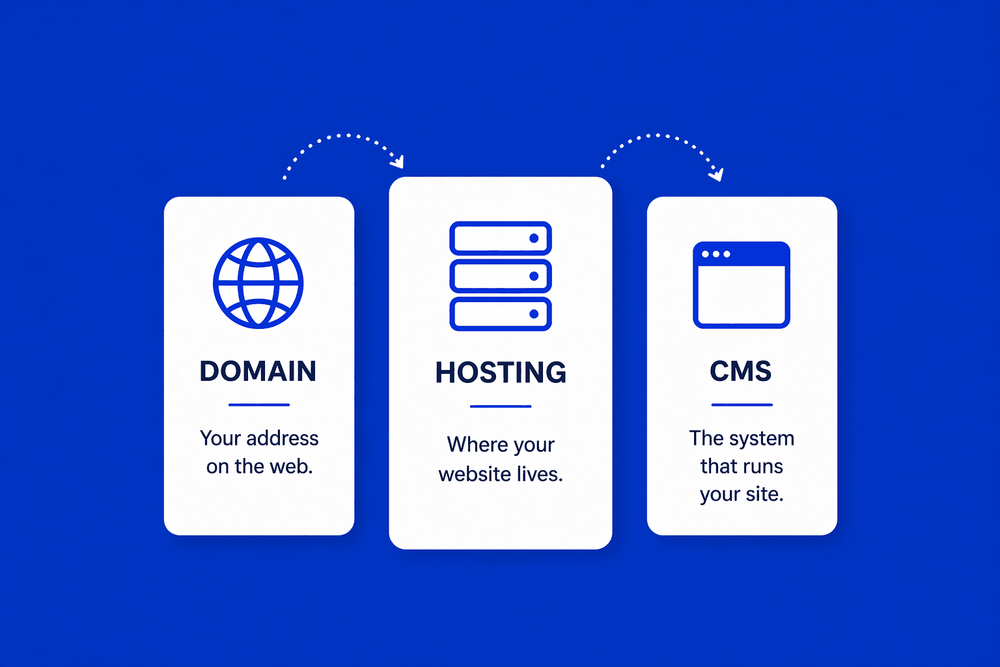
Every website - no matter how simple or complex - runs on three separate things: a domain, hosting, and a CMS. They work together, but they're not the same thing, and mixing them up is how businesses end up overpaying, losing access to their own sites, or getting locked into platforms they can't escape.
Think of it like a physical shop. Your domain is your address - the thing people type to find you. Your hosting is the building - where everything actually lives. And your CMS is the interior - the system you use to manage what's inside.
You need all three. But you don't have to buy them from the same place, and understanding the difference gives you a lot more control over what you're spending and why.
Your domain - the address
Your domain is your website address. It's the thing that appears in the browser bar and in your email - something like yourbusiness.co.uk or yourbusiness.com.
You don't buy a domain outright. You rent it, typically on an annual basis. A .co.uk or .com domain costs around PS10 to PS15 a year from a reputable registrar. That's it. There's nothing technically complex about it - it's a name that points visitors to wherever your website is hosted.
The single most important rule with domains: make sure it's registered in your name, not your web designer's. We've seen businesses lose access to their own domain because it was registered under an agency's account and the relationship broke down. Your domain is your business identity online. It needs to be yours - registered to your email address, with your payment details, in an account only you control.
If you're not sure who owns your domain right now, you can look it up for free at who.is - it will tell you the registrar and the registered contact details.
Your hosting - the building
Hosting is the server where your website's files actually live. When someone visits your website, their browser sends a request to your hosting server, which sends back the files - images, text, code - that make up your pages.
There are a few types of hosting worth knowing about:
- Shared hosting - your website shares a server with hundreds of other sites. It's the cheapest option (often PS3 to PS10 per month) and perfectly fine for a small business with modest traffic.
- VPS hosting - a Virtual Private Server gives your site its own dedicated slice of a server. More reliable, more control, mid-range cost (PS20 to PS60 per month).
- Dedicated hosting - your site gets its own physical server. Overkill for most small businesses, but relevant for high-traffic or complex sites.
For most small business websites, good shared or entry-level VPS hosting is all you need. The key word is good. Cheap hosting from a provider with overcrowded servers will slow your site down - and a slow site loses customers. We've written about how load speed directly affects both your Google rankings and your conversion rate in our post on Core Web Vitals.
One thing to check: does your hosting include email? Many business owners assume it does - some plans include it, some don't. Worth confirming before you sign up.
Your CMS - the control panel
CMS stands for Content Management System. It's the software that lets you update your website without touching any code - adding a new service, publishing a blog post, changing your opening hours, uploading a photo.
The most common CMS by a significant margin is WordPress, which powers around 43% of all websites globally. It's open source, highly flexible, and you own your content completely. The downside is it requires hosting to run on - it doesn't come with its own server.
Other platforms - like Wix, Squarespace, or Shopify - bundle a CMS together with hosting and sometimes a domain into one monthly subscription. That brings us to the next point.
What all-in-one platforms actually include
Platforms like Wix and Squarespace are popular because they simplify everything into one bill. You pay a monthly fee, and you get a domain (sometimes), hosting, and a website builder all in one place.
The convenience is real - especially for businesses that just need something live quickly without involving a developer. But there's a tradeoff that most people aren't told about upfront.
The platform lock-in question is one we bring up with every client who comes to us from Wix or Squarespace. Can you export your content? In most cases: not really. Your pages, your images, your blog posts - they live inside the platform. If you ever want to move, you're largely starting from scratch. That's not a reason never to use them, but it's something you should know before you commit.
The other thing to watch: pricing. These platforms often offer low introductory rates that increase significantly on renewal, and features that seem standard are often gated behind higher tiers. Always read what's included at the price you're actually going to pay long term, not the headline launch offer.
The questions you should be able to answer about your own website
You don't need to understand the technical detail behind any of this. But you should be able to answer four questions:
- Who owns my domain? Is it registered in your name, and do you have access to the account?
- Who hosts my website? Do you have login details for your hosting, or does only your agency?
- What happens to my content if I stop paying? If you cancel your platform or hosting, can you take your content with you?
- Can I give another agency access if I need to? You should always be able to bring in a new developer without depending on your current one to hand things over.
Every website we build, we make sure the client owns their domain, understands who their hosting is with, and can access everything independently of us. That's not just good practice - it's the only honest way to work. A client should never be dependent on their agency just to keep the lights on.
If you can't answer those four questions about your current setup, it's worth finding out - before you need to.
What a typical small business website actually costs to run
A well-set-up small business website in the UK typically runs to:
- Domain: PS10 to PS15 per year
- Hosting (good shared or entry VPS): PS50 to PS150 per year
- CMS: Free (WordPress) or PS200 to PS500 per year (all-in-one platform)
- SSL certificate: Usually included with hosting - if anyone charges extra for this, that's a red flag
So somewhere between PS60 and PS650 a year, depending on your setup. That's the infrastructure cost - what keeps the site live.
What that doesn't account for is your time. All-in-one platforms like Wix and Squarespace sit at the higher end of that range, and they still require you to build, manage, and update everything yourself. You're paying more for the privilege of doing the work. For a business owner whose time has real value, that's worth factoring in.
A custom-built site on good hosting tends to cost less annually, performs better, and doesn't trap you in a platform you can't leave. We've covered the full picture of what self-build platforms actually cost - beyond the monthly fee - in Website in Minutes, Regret in Years.
The honest question isn't just what does this cost - it's what does this return? A website that generates consistent enquiries pays for itself quickly. One that sits there looking finished but converting nothing costs you money every single month, regardless of how cheap the hosting is. We'll be covering how to think about website ROI properly in a future post.
Know what you're paying for
Understanding these three layers won't make you a web developer. But it will make you a better-informed client - one who knows what questions to ask, who owns what, and whether you're getting good value for what you're spending.
If you're not sure what your current setup looks like, or you're worried you might be overpaying or locked into something you can't get out of, we're happy to take a look. Our first consultation is free and we'll give you a straight answer.
Not sure what you're actually paying for with your website? We'll review your setup and tell you exactly what you have, what you need, and what you could be doing without.
Book a ConsultationFAQ
What will you learn in "Domain, Hosting, CMS - What You're Actually Paying For"?
One of the first things we ask new clients is: do you know where your domain is registered? About half of them don't. Some don't even know what a domain is - they just know they pay something every year to someone, and...
Why is The three layers every website runs on important?
Because it directly affects trust, message clarity, and conversion before someone contacts you.
What is the best first step?
Apply one practical change this week, measure the result, and repeat with the next highest-impact improvement.

Categories: Planning and costs