What Are Core Web Vitals - And Why Should a Small Business Care?
Core Web Vitals are Google's three scores for how your website feels to real users. Here's what LCP, INP, and CLS actually mean - and what to do if your scores are poor.
Quick answer
We had a client last year who'd spent PS1500 on Google Ads. When we looked at the site, it was taking nine seconds to load on mobile. The ads were working fine - the website was the problem.
Key takeaways
- So, what are Core Web Vitals for a small business?
- LCP - does your main content appear quickly enough?
- INP - does your site respond when someone taps or clicks?
- CLS - does your page jump around while it loads?
We had a client last year who'd spent PS1500 on Google Ads. Zero enquiries. When we looked at the site, it was taking nine seconds to load on mobile. The ads were working fine - the website was the problem.
Every week we look at a new client's website and the story is almost always the same - the business is solid, the service is good, but the site is quietly turning people away before they've even read a single word.
Most of the time, the culprit isn't the design. It's how the site performs. And that's exactly what Core Web Vitals are built to measure.
In this post, we'll explain what Core Web Vitals actually are, why they affect both your Google rankings and your enquiry rates, and what you can do about them - without needing a developer on speed dial.
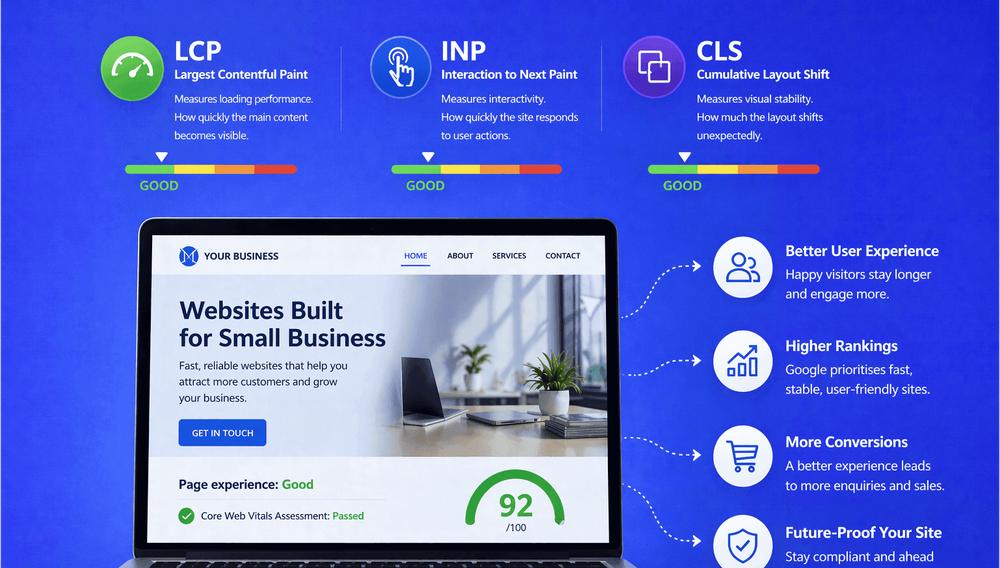
So, what are Core Web Vitals for a small business?
Core Web Vitals are three scores that Google uses to measure how your website feels to a real visitor. Not just whether the page loads - but how fast, how stable, and how responsive it is when someone actually tries to use it.
Google introduced these metrics as part of how it ranks websites, and in March 2026 it strengthened how much weight they carry. The idea is simple: a website that feels fast and smooth is more likely to keep visitors around. A website that feels slow or broken is more likely to lose them - and Google knows it.
Here's what each of the three scores actually measures.
LCP - does your main content appear quickly enough?
LCP stands for Largest Contentful Paint. In plain terms, it measures how long it takes for the main piece of content on your page - usually your hero image or headline - to appear on screen.
Google's threshold for a good score is under 2.5 seconds. If it takes longer than that, your visitors are sitting there staring at a half-loaded page before they've even seen what you do.
Think of it like a shop window. If it takes nine seconds for the display to appear, most people have already walked past.
INP - does your site respond when someone taps or clicks?
INP stands for Interaction to Next Paint. This one measures how quickly your website reacts when a visitor does something - taps the menu, clicks a button, fills in a field.
A good score is under 200 milliseconds. That's fast enough that it feels instant to a human. Anything slower starts to feel laggy or unresponsive.
This is currently the most commonly failed Core Web Vital - 43% of websites still don't meet the threshold. If someone taps your mobile menu and nothing happens for half a second, they don't think slow website. They think something's broken.
CLS - does your page jump around while it loads?
CLS stands for Cumulative Layout Shift. This measures how much your page moves around while it's loading - text shifting down, buttons jumping position, content reappearing in a different place.
A good score is under 0.1 (the lower the better). We've all experienced this: you go to tap something on your phone and the page shifts just as you press, so you end up clicking the wrong thing. That's CLS in action.
It's a small frustration that has a big impact - especially on mobile, where most of your visitors are coming from.
Why Core Web Vitals actually matter for your business
This isn't just about Google rankings - though that matters too.
A slow website doesn't just hurt your position in search results - it hurts your reputation. If someone taps a button and nothing happens for two seconds, they don't think slow site. They think dodgy company. That first impression is hard to recover from.
We often see businesses spending money on SEO or ads, frustrated that it's not working. Nine times out of ten, the traffic is arriving - it's just bouncing straight off because the site feels broken. Fixing your Core Web Vitals doesn't just help Google. It helps the actual humans trying to use your site.
The numbers back this up. A one-second delay in load time can reduce conversions by up to 7%. Pages that load in under two seconds have a 9% bounce rate. Pages that take over five seconds? That jumps to 38%. For a business that relies on its website to generate enquiries, that gap is significant.
On the rankings side: Core Web Vitals act as a tiebreaker. When two websites are competing for the same keyword with equally good content, Google consistently favours the faster, more stable one. Currently, only 47% of websites pass all three thresholds - which means there's a real opportunity here for businesses willing to take it seriously.
How to check your scores for free right now
You don't need a developer to get started. There are two free tools from Google that will give you a clear picture in just a few minutes.
PageSpeed Insights (pagespeed.web.dev) is the simplest option. Just paste your website URL into the box, hit analyse, and Google will show you your scores for both mobile and desktop - along with specific recommendations for what to fix. Mobile is the one to focus on first.
Google Search Console gives you a broader view across your whole site. If you've already set it up (and you should have), go to the Experience section and open the Core Web Vitals report. It will show you which pages are passing, which need improvement, and which are failing - grouped by issue type.
Start with PageSpeed Insights if you've never checked before. The results might surprise you.
What poor scores usually mean in practice
When we audit a new client's website, poor Core Web Vitals almost always come down to a handful of the same issues:
- Images that haven't been optimised - large files that take too long to download, especially on mobile connections
- Too many third-party scripts - live chat widgets, cookie banners, tracking pixels, social media embeds. Every one of these adds load time.
- No caching set up - meaning the browser has to re-download everything each time a visitor lands on a page
- Bloated themes or plugins - loading code for features you're not even using
That last point leads us to something worth saying directly.
If your site is built on a DIY platform like Wix or Squarespace, poor Core Web Vitals scores are almost guaranteed. These platforms load a huge amount of code that your visitors' devices have to process - most of which has nothing to do with your business. It's one of the reasons we don't build on them.
The cheapest websites are often the slowest. Drag-and-drop builders and template sites are convenient to set up, but they're notorious for bloated code and heavy scripts that tank your performance scores - and your Google rankings along with them.
We've written in more detail about the hidden costs of self-build platforms if you want to understand exactly what you're trading off: Website in Minutes, Regret in Years: The Hidden Costs of Self-Build Platforms.
What you can do about it
If your scores are poor, here's where to start - whether you're handling it yourself or briefing someone to help.
Quick wins you can action now:
- Compress your images before uploading. Tools like Squoosh (free, from Google) can reduce file sizes by 70-80% without any visible quality loss.
- Remove any third-party widgets you're not actively using - especially live chat tools and social media feed embeds.
- Ask your hosting provider whether caching is enabled on your account. Many shared hosts have this switched off by default.
Things to discuss with your developer:
- Are images being served in a modern format like WebP rather than JPG or PNG?
- Is there a Content Delivery Network (CDN) in place to serve your site faster to visitors in different locations?
- Is JavaScript being deferred so it doesn't block the page from loading?
You don't need to understand the technical detail behind these questions - you just need to know they're worth asking.
A two-minute check that could explain a lot
Most small business owners we speak to have never checked their Core Web Vitals scores. That's not a criticism - you're busy running a business. But it takes about two minutes to check, and what you find might explain a lot.
Your Core Web Vitals affect both how Google ranks your site and how likely visitors are to stay and enquire once they arrive. Fixing them is one of the highest-ROI improvements you can make to your website - because it benefits every single visitor, every single day.
If you've run the check and your scores are poor, or you're not sure what to do with what you're seeing, we're happy to take a look. Our first consultation is free, and we'll give you a straight answer about what's causing the issue and what it would take to fix it.
Not sure how your Core Web Vitals scores look? We'll review your site's performance and show you exactly what needs fixing - no jargon, no scare tactics, just honest advice.
FAQ
What will you learn in "What Are Core Web Vitals - And Why Should a Small Business Care?"?
We had a client last year who'd spent PS1500 on Google Ads. When we looked at the site, it was taking nine seconds to load on mobile. The ads were working fine - the website was the problem.
Why is So, what are Core Web Vitals for a small business? important?
Because it directly affects trust, message clarity, and conversion before someone contacts you.
What is the best first step?
Apply one practical change this week, measure the result, and repeat with the next highest-impact improvement.

Categories: SEO and Google